Building your own KeepRight
KeepRight (the concept, not the website) is made of a few different moving parts. The heart of it is the specification; it is the thing that powers all the declarations on this website. keepright.info is a collection of tools built around that specification, but they are built with the understanding that other people can, and should, build their own implementations.
It looks a bit like this.
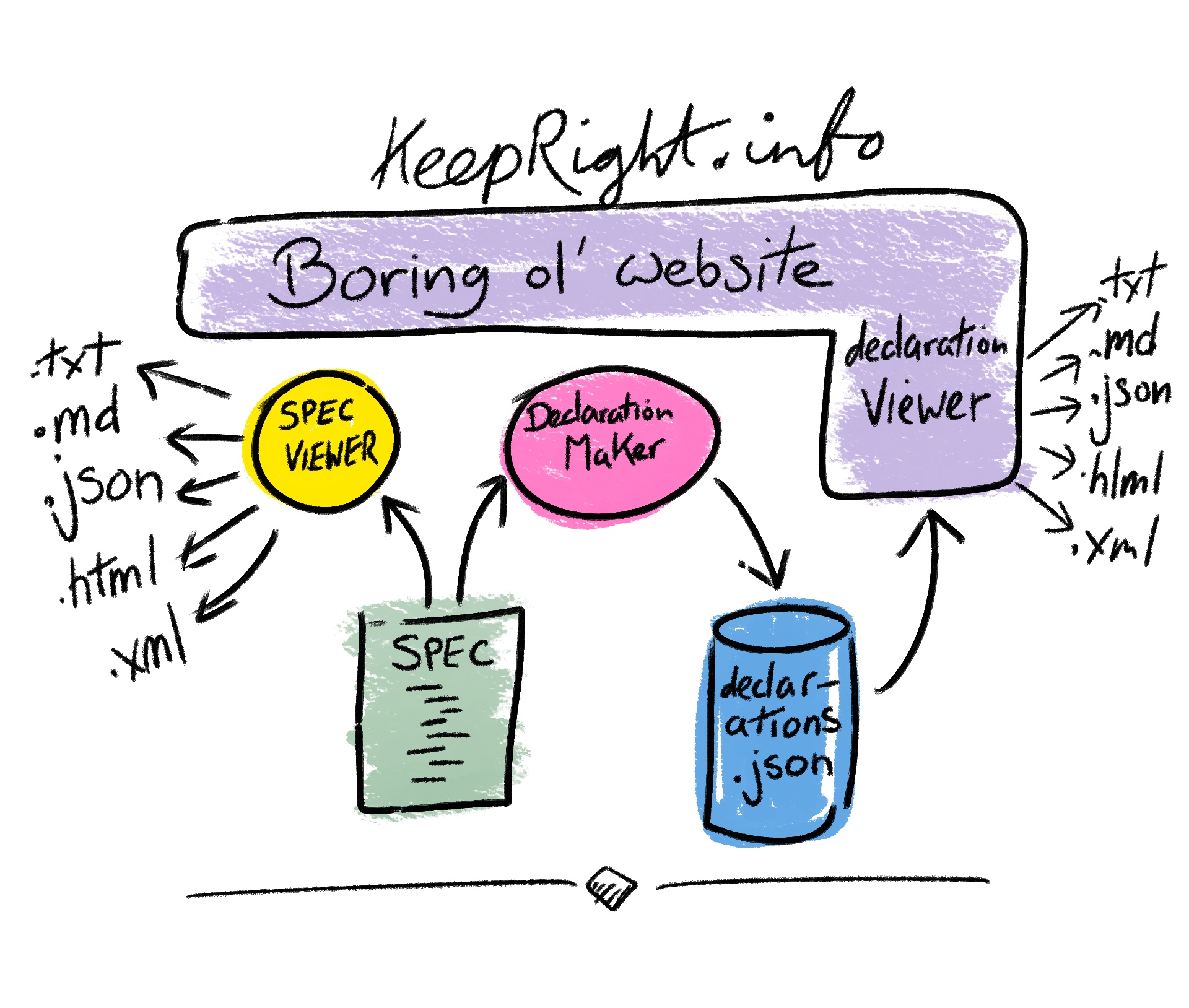
keepright.info is a boring old website, mostly made of HTML pages. Underneath it live two separate web apps: the spec viewer and the declaration maker, and also as part of the site, the declaration viewer. They just happen to be styled to look the same as the rest of the website.
But that doesn't mean you're stuck with using our website for all of this, we encouraged you to write your own implementations. Or, you know, we can, ahem 💰, write and integrate them into your system for you — probably.
1. The Specification #
The specification is the source of all truth. It is written in JSON so that computers can read it easily. We are evolving the specification and have put together our first pass (the heart and essence of what KeepRight is) which we first revealed at the 2026 IIIF Annual Conference & Showcase in the Netherlands.
We are actively looking for feedback on the specification and encourage you to contribute. We have placed it on GitHub so that it is accessible and versioned, and the full history of changes can be seen in the commit history. You can make suggestions to us directly by email or via issues on GitHub.
The spec lives on GitHub and is written in a format designed to be read and extended by other tools; if you need something that works in a fundamentally different way, forking or extending it is the right path. We will take suggestions for modifications to the core specification, but we can't be all things to all people.
The spec is explained in more detail down below.
2. Spec Viewer #
JSON is written for computers, not people, so it is not the easiest thing to visualise. The first thing we built was a specification viewer. The spec viewer pulls the latest spec directly from GitHub and renders it as human-readable output: plain text and Markdown, plus JSON (that bit was easy) and XML for computers.
It also produces two HTML views: one is a straightforward HTML representation of the specification itself, and the other is a quick form generated directly from the spec, useful for seeing at a glance what fields are required and what they mean.
You will find our implementation of the spec viewer on the specifications page, where you can click through all those formats without ever needing to open the JSON file.
In the unlikely case that you want to create your own spec viewer, we have made the source of ours public. It is on GitHub, it is probably the least exciting part of the whole thing.
3. Declaration Maker #
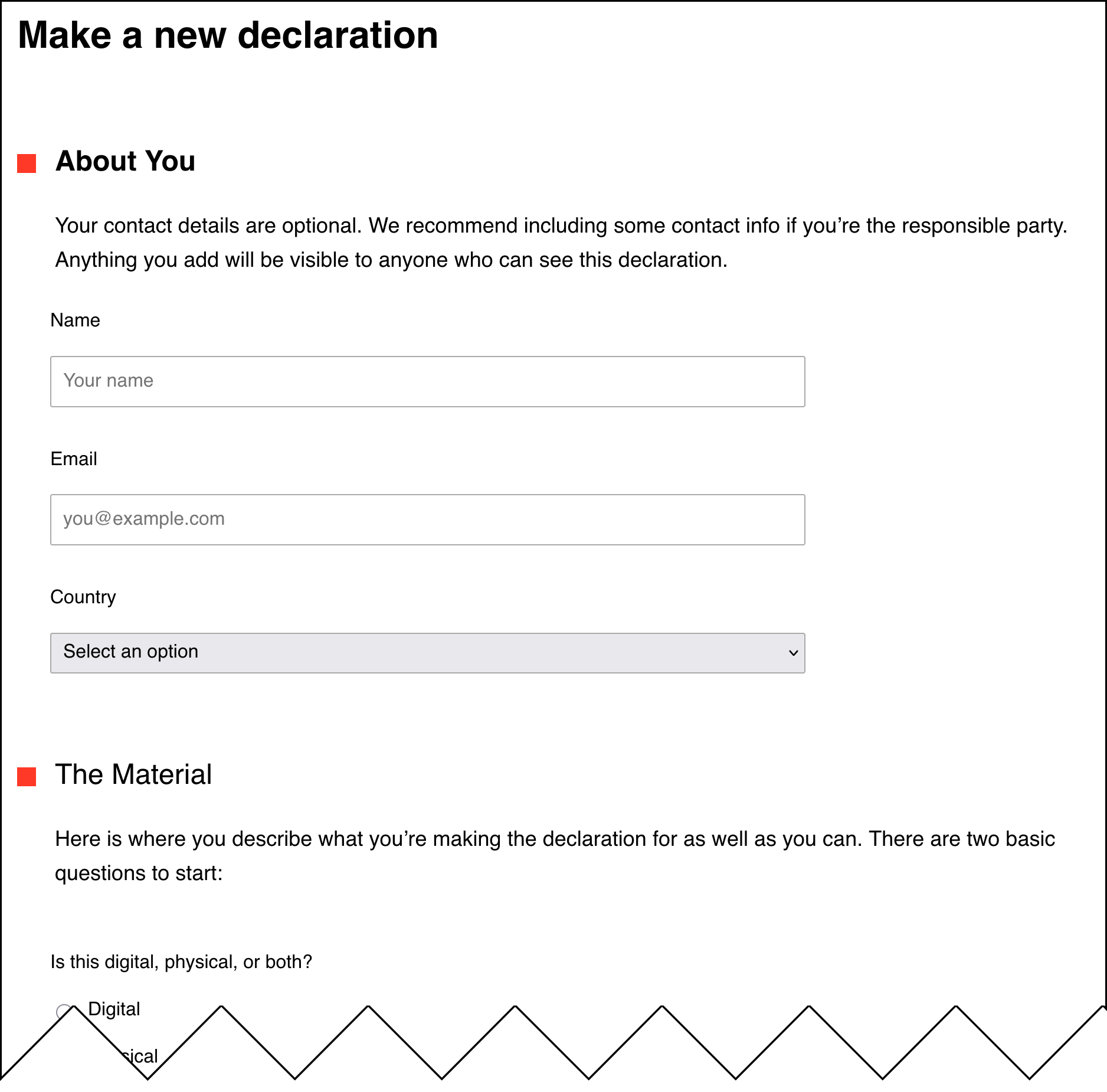
The declaration maker is probably the most important part. In essence, it reads in the specification (from GitHub, or your own version of it) and turns it into a format where an end user can answer the questions described in it. Those answers are then saved as a declaration.
On our site, that means it reads the spec from GitHub (again), turns it into an HTML form. Someone can then go through that form which saves the resulting declaration onto our own server.
There are a few reasons you might want to run your own declaration maker. The first is that you may not want to rely on keepright.info for making declarations. We are very happy to create declarations, store them, preserve them, and serve them back from our API when given an ID; we promise to take care of them.
But you may not wish to depend on keepright.info, and instead want to create hundreds or thousands of declarations from within your own software, assigning your own IDs. For example, you might integrate a declaration maker directly into your content management system (CMS), your digital asset management (DAM) system, or whatever tools you happen to use.
In that case you would read in the latest version of the spec (or whichever version you choose to pin to, or your own forked or extended version of the spec); see the GitHub page for the specification for more on that.
💡
We believe strongly in separating data from presentation, the spec is just what should be asked, it's left up to you to decide how they should be presented.
The specification is divided into three parts; meta - for a handfull of settings, mainly version numbers, logic - which we'll come to in a moment, and finally items where everything else lives.
The very technical way to understand the spec is by reading the schema. But is basically boils down to this...
items are arrays of things, you walk the array of things looking at what kind of thing each one is, and then respond accordingly.
There are two items which act as logical collections of other things; section and group, and both of these will itself always contain array of items. The main difference between the two is that a section must have a title, while a group doesn't — both of them may have a description. A group can be used to 'invisibly' group things together, while a section strongly hints that it should have some visual formatting around it.
These are our current top-level sections
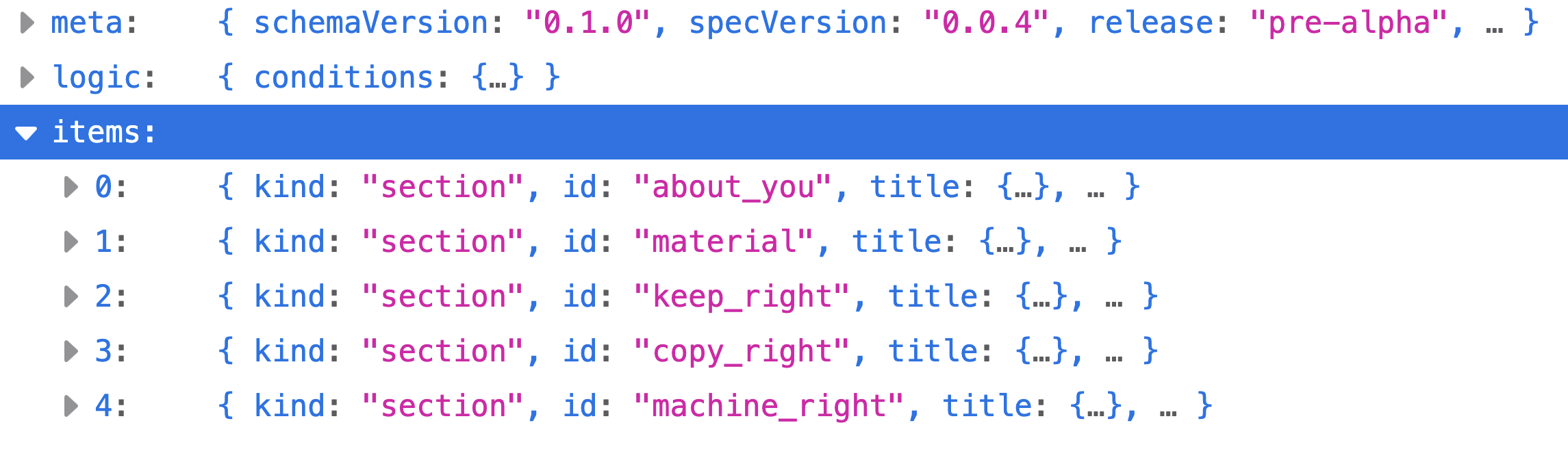
Sections don't have to be top-level, they could be contained by other sections and groups, it just so happens that we don't do that currently, but the option is always there.
A section must contain items. Here's the first 'About You' section.
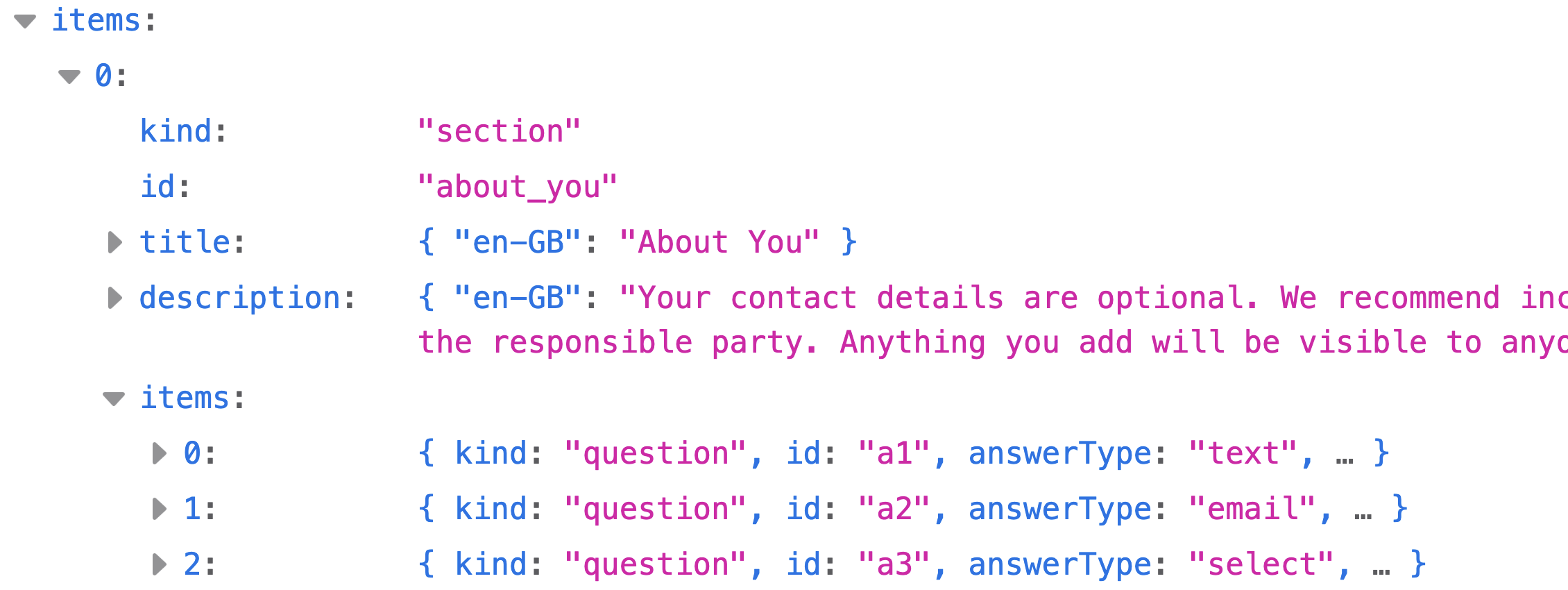
It only contains three items, and they are all questions 😁
Meanwhile this is the second section.
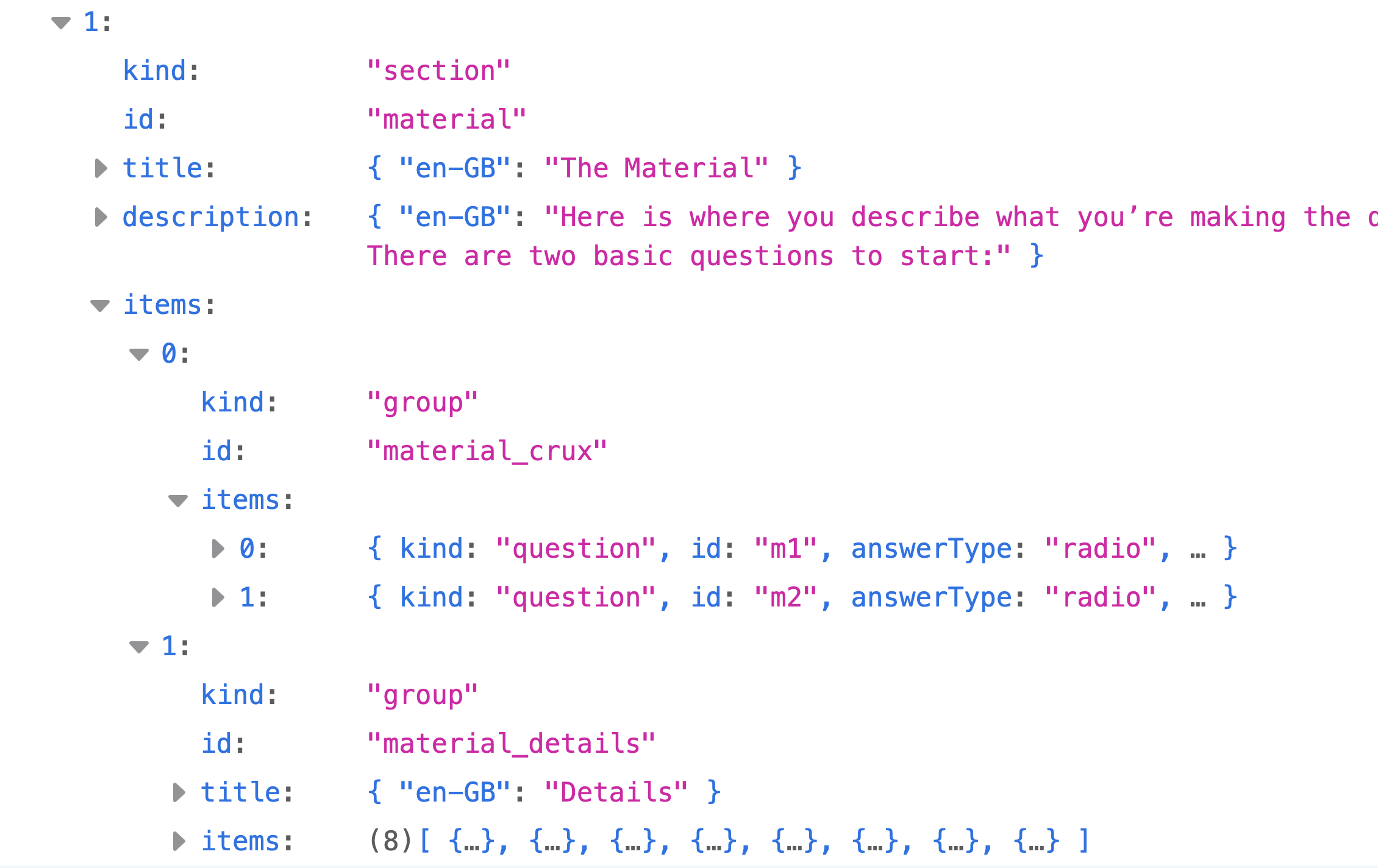
Instead of questions, it's divided up into two groups. The first group contains two questions, and has no title, the second group contains eight items (which all happen to be questions), and does have a title.
Hopefully by now you're getting the hang of it. The items array can be a mix, so a section could have an items array that contains a couple of questions, then a group, a note, another few questions, another whole section, and heck let's finish with a group; and those sections and groups will all have their own items array.
One last thing to note is that titles, descriptions, labels and notes are all using locale codes/language tags as a locale key for localised text. So far we only have en-GB but as the spec settles we'll start to add other languages.
💡
The meat of the specification is the questions. Again, the spec doesn't really care how the questions are displayed or asked, only that they are, and that the details are right. In our own declaration maker we're using CSS to layout the forms, some javascript to control turning questions on and off, and some additional javascript to add useful placeholder text into some of the input boxes and text areas.
These are all done to make filling in a declaration a nicer experience on the web, if you are setting up a CMS or DAM then your ui needs may be different (believe us, we've seen some scary DAM ui in our time), and you have the flexibility to add helpers and guides over the top of what the spec provides.
Here's a quick look at some questions.

Pretty easy!
Here's a couple more types you should be familiar with, and introducing a new thing; visibleWhen, which we'll cover in a moment.
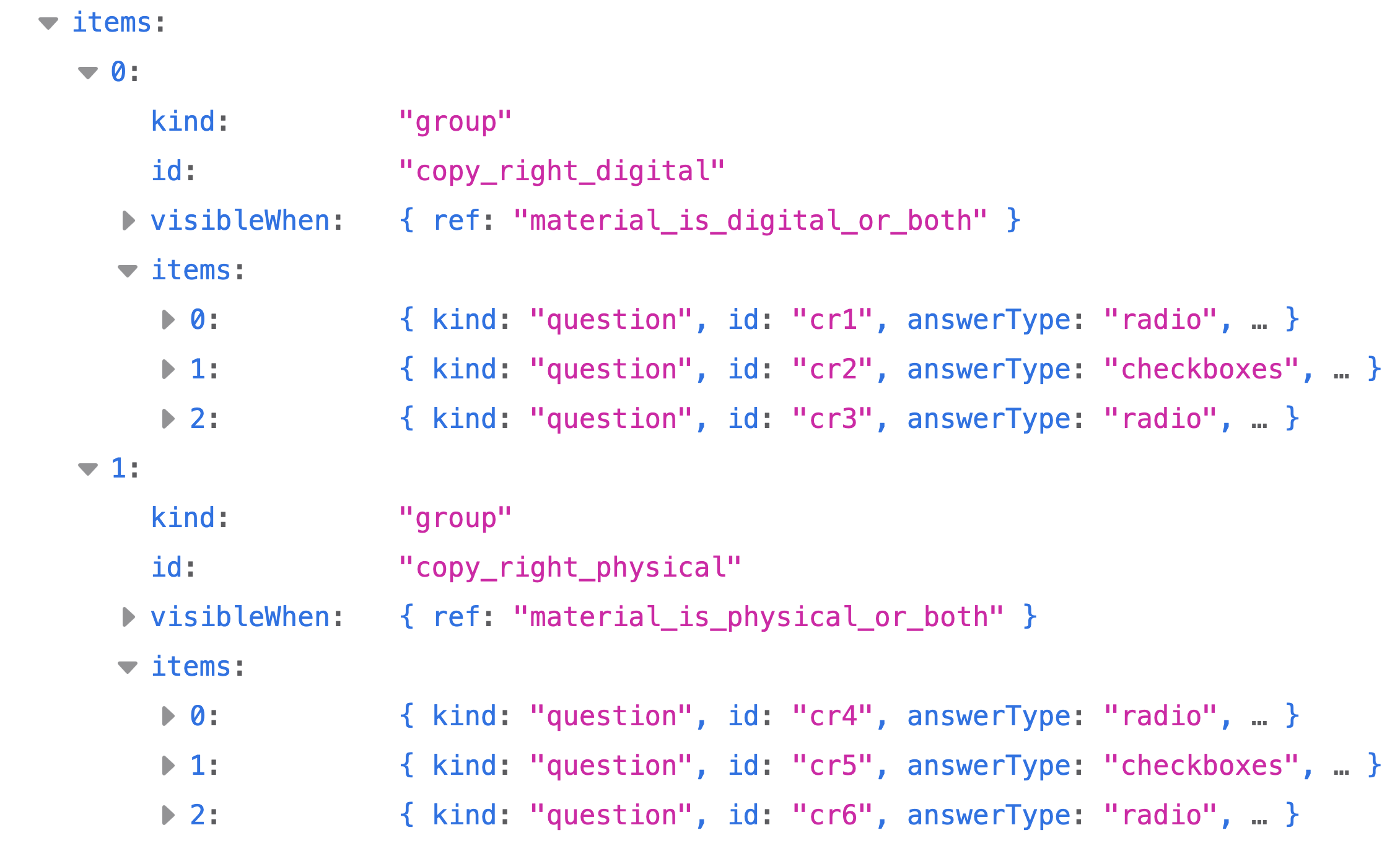
Lastly an even move complicated one where the third question (index 2) has not only visibleWhen but also followups.
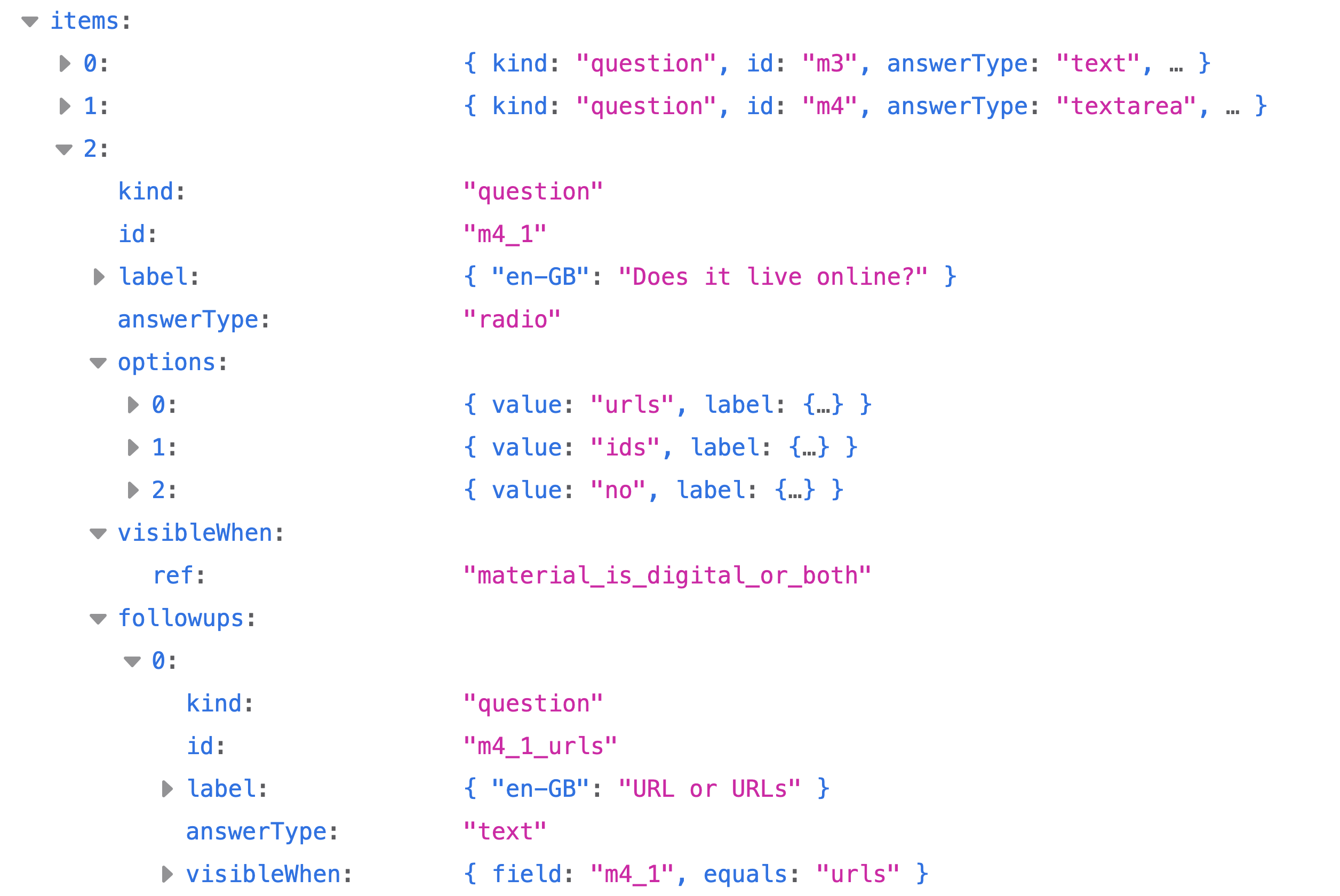
followups are, well, follow-up questions that show up based on various selections, in this case the question id m4_1_urls "URL or URLs" should be displayed if the "urls" radio option was selected for question id m4_1 "Does it live online?"
There's also some conditional logic built into the specification itself. Near the top of the spec you will find a set of named conditions, and some questions are only shown depending on the answers given to other questions. So a certain amount of presentation logic is required to honour the spec correctly.
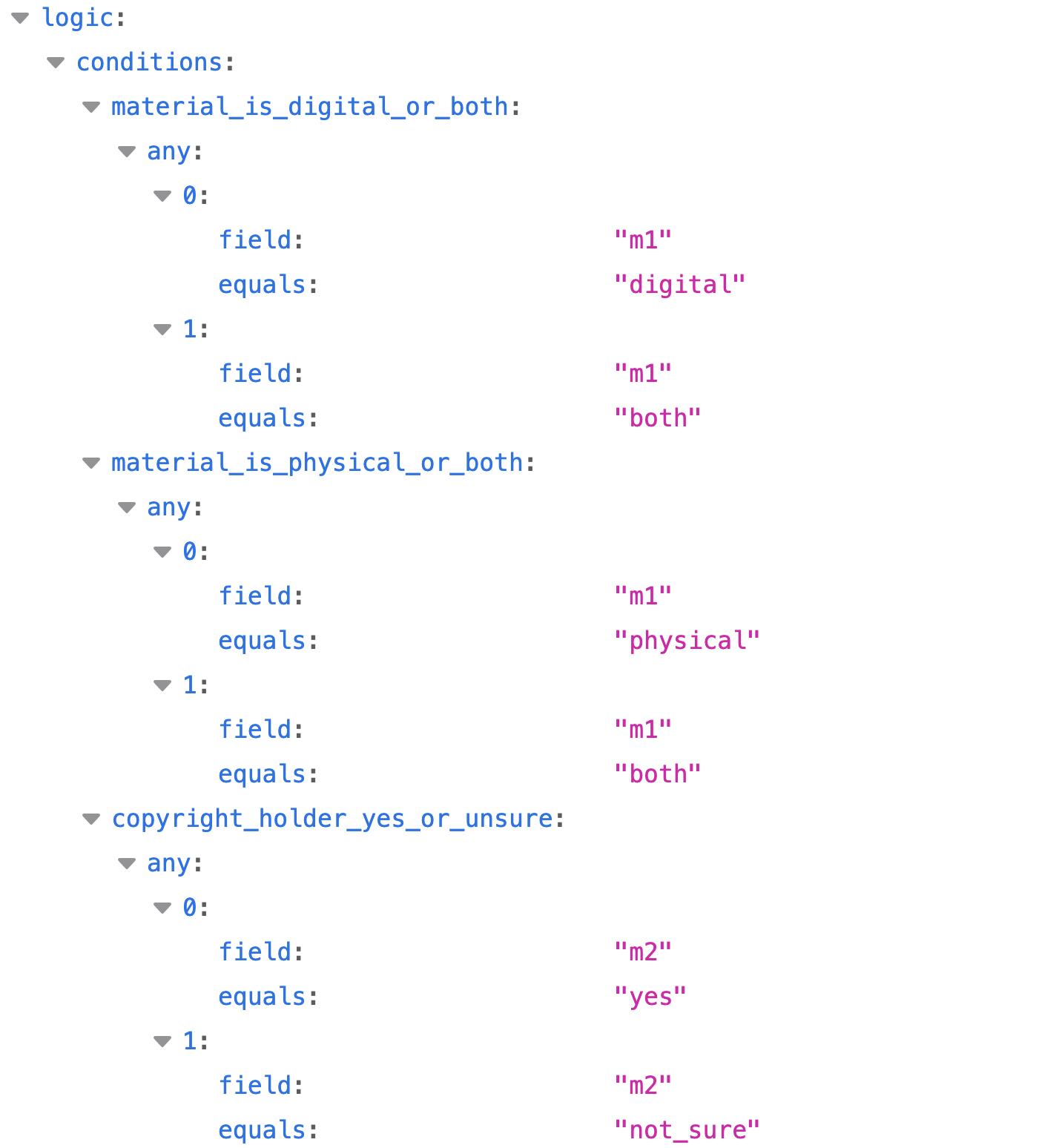
An example in this case; the question "Does it live online?" is visibleWhen the condition "material_is_digital_or_both" is true. And that is true when question m1 "Is this digital, physical, or both?" is set to digital or both.
This spec is new, we know specifications have a tendency to grow, and sprawl and get more complicated and convoluted — we swear to try and keep the whole logic section as minimal and clear as possible!
Hopefully this has made the spec JSON a little more understandable, but at the end of the day it's going to be computers that read the file and do something with it, and to help them we've also added schemas. You don't need the schemas to build a declaration maker; you can pull the spec and run with it. However, if you want the declarations your maker produces to be compatible (so they can be used anywhere a KeepRight declaration is expected) they should validate against the declaration schema. You can of course store declarations in your own format too, but they would be specific to your implementation rather than interoperable with the wider KeepRight ecosystem.
4. Declaration Viewer #
On keepright.info, a declaration is stored in JSON format. Just as spec.json is the source of truth for the specification, our declaration.json is the source of truth for a declaration. Validated against the declaration schema, it is the machine-readable ground truth for each declaration.
Most of the time, though, people will just want a plain text version, a Markdown file, or a PDF to put alongside whatever it is they are making the declaration for. So when a declaration is created on our website, we render it into those formats and let the user download and view it in whichever way is most convenient.
The declaration viewer is the sister to the spec viewer; they are the two bread-end pieces of a sandwich with the declaration maker sitting in the middle. Where the spec viewer takes the specification and renders it into a range of human-readable formats, the declaration viewer does the same for declarations.
Dan thought he'd already built the declaration viewer as a separate app; turns out it's built directly into keepright.info site. So there is no standalone example repo to point you at just yet. One is coming very shortly.
However, please feel free to make your own declaration viewer. And if you do make something beautiful, fancy, fantastic, or otherwise splendid (particularly a viewer and/or validator that people can drop their declaration.json files into), let us know. We would love to see it, and we will talk about it and link to it.